Automatic Attack Disruption isolation bypass in Microsoft Defender
Disclaimer
PRIDE Security makes no warranties regarding the information contained in this document and assumes no responsibility for any errors that may be present. Under no circumstances shall PRIDE Security or any of its partners be liable for damages arising from the use of the information described herein. PRIDE Security reserves the right to modify or update this content at any time without prior notice.
Summary
PRIDE Security is frequently hired to simulate attacks and analyze evasion vectors originating from client devices, from an offensive security perspective. A common request from clients is to validate ways to evade the Automatic Attack Disruption mechanism in Microsoft Defender. Across these projects, we identified several mechanisms for neutralizing the network isolation applied by this feature, and we will share a simple technique that has worked in every environment tested so far. The block is bypassed by renaming the registry key in which the Base Filtering Engine (BFE) stores the persistent filters of the Windows Filtering Platform (WFP).
| Item | Details |
|---|---|
| Affected Product | Microsoft Defender for Endpoint / Microsoft Defender XDR (Automatic Attack Disruption) |
| Exploited Component | HKLM\SYSTEM\CurrentControlSet\Services\BFE\Parameters\Policy\Persistent key |
| Prerequisite | Local administrator privileges on the machine |
| Required Action | Rename the key and restart the operating system |
| Impact | Restoration of network communication from a compromised host without explicitly removing WFP filters |
| MITRE ATT&CK | T1562.004 (Impair Defenses: Disable or Modify System Firewall), T1112 (Modify Registry), T1529 (System Shutdown/Reboot) |
Automatic Attack Disruption
Automatic Attack Disruption is a Microsoft Defender XDR feature that correlates telemetry from multiple sources to identify ongoing attacks and automatically contain compromised hosts, limiting lateral movement and reducing the impact of the incident. According to Microsoft’s documentation, the process is divided into three steps:
- Correlating signals from different sources into a single incident;
- Identifying assets controlled by the attacker;
- Automatically executing response actions across Microsoft Defender products to contain the attack in real time.
Isolate device and Contain device
- Isolate device — The policy is applied locally on the compromised host to block the machine’s network communication, allowing only communication with the Microsoft Defender services necessary for management and telemetry.
- Contain device — The policy is applied to the other managed devices in the environment, which then block communication with the contained machine. Since the policy does not reside on the target host, it is not affected by the technique described in this document.
Windows Filtering Platform (WFP) and Base Filtering Engine (BFE)
The WFP (Windows Filtering Platform) is the network filtering subsystem in Windows, responsible for classifying traffic across multiple layers of the TCP/IP stack. The objects relevant to this analysis are:
| Object | Function |
|---|---|
| Filter | Classification rule: conditions, action (Permit, Block, or Callout), flags, and weight |
| Layer | Point in the network stack where classification is performed |
| Sublayer | Container for filters with their own weight, used in policy arbitration |
| Provider | Logical grouping of objects associated with a service or application |
The WFP has three main categories related to the persistence of created objects:
- Dynamic — automatically removed when the session that created them is terminated.
- Static — remain until explicitly removed or until the BFE is shut down.
- Persistent — survive reboots and remain until explicitly removed.
A host’s containment must survive a reboot; therefore, persistent filters are the mechanism used to enforce blocking rules.
The BFE (Base Filtering Engine) is the user-mode service that manages the WFP policy. The non-volatile state of the WFP is stored in two registry keys under the BFE service, each with a distinct role:
| Content | Path | Used by |
|---|---|---|
| Boot-time filters | HKLM\SYSTEM\CurrentControlSet\Services\BFE\Parameters\Policy\BootTime |
TCP/IP driver (tcpip.sys) |
| Persistent objects | HKLM\SYSTEM\CurrentControlSet\Services\BFE\Parameters\Policy\Persistent |
BFE |
As documented by Quarkslab, during initialization, the BFE first loads the built-in objects embedded in bfe.dll, and then the persistent objects from the Persistent key, replacing the boot-time filters.
Technique Description
Threat Model
- The attacker has code execution with local administrator privileges on the host, which grants write access to
HKLM\SYSTEM, including the BFE service configuration keys. - The host is under the Isolate device policy. The technique does not apply to Contain device / Contain IP, as the policy is enforced on other endpoints.
- The attacker is capable of triggering a system reboot.
Rationale
Isolation filters are persistent WFP objects, and the BFE reconstructs the persistent state from the Persistent key at each initialization. The absence of this key is treated by the BFE as a valid initial state, not as an anomalous condition. The BFE simply needs not to find the key under the expected name at boot to initialize without the isolation filters. As a result, communication from the compromised host resumes, and the blocking rules are not reapplied by Automatic Attack Disruption.
Steps Taken to Evade Device Isolation
-
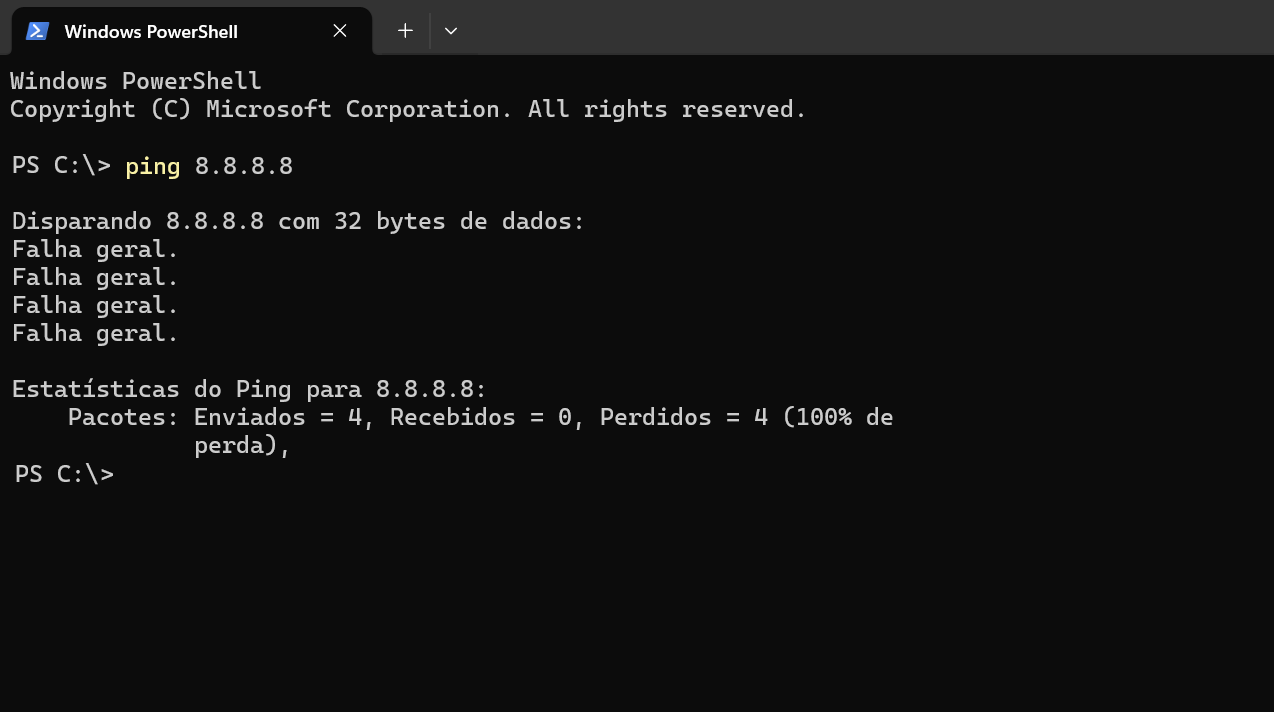
Automatic Attack Disruption applies Isolate device to the host. The blocking WFP filters are created as persistent and serialized in the
HKLM\SYSTEM\CurrentControlSet\Services\BFE\Parameters\Policy\Persistentkey. Network traffic is blocked, with the exception of communication with Microsoft Defender services.
-
The Registry Editor is used to view the keys in the operating system's registry.
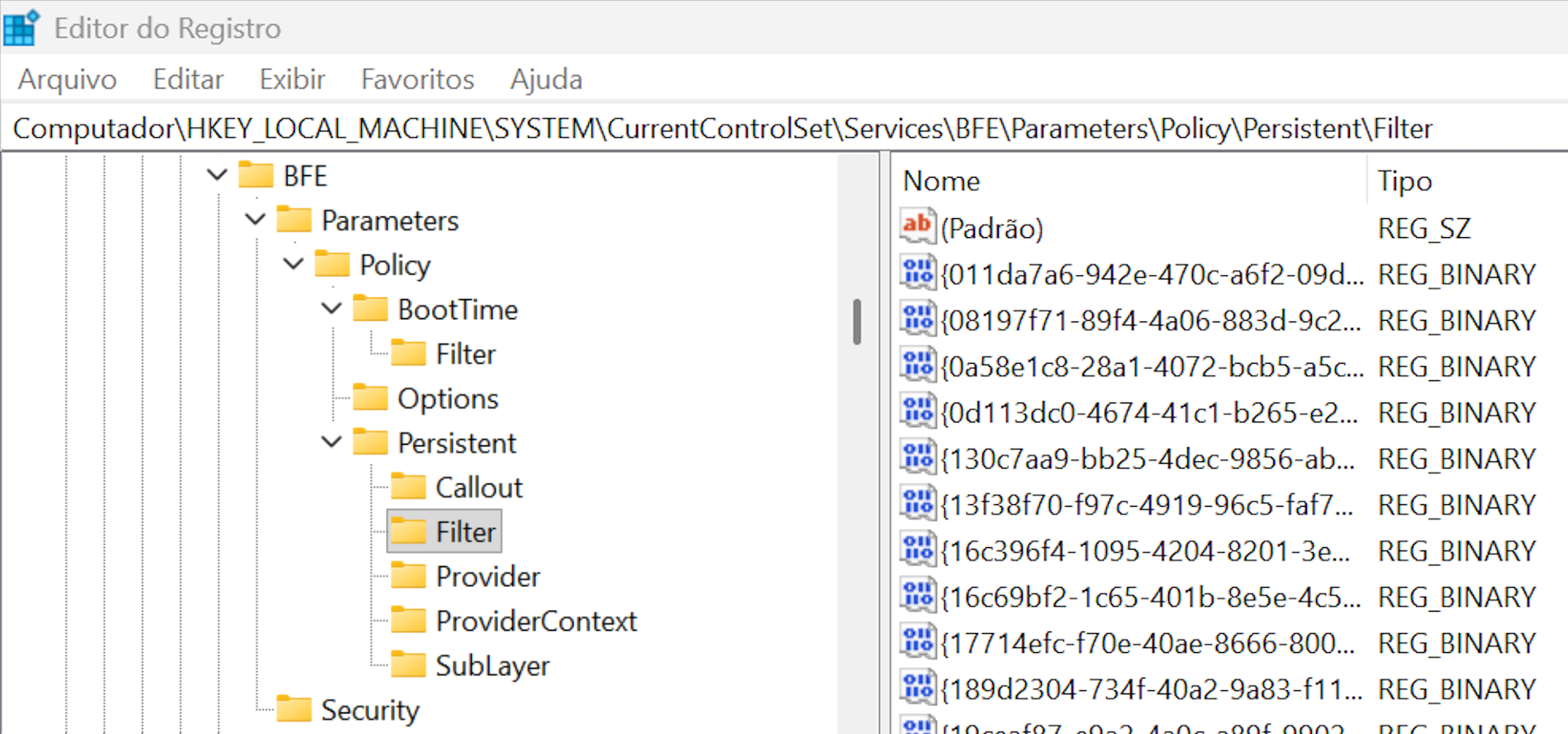
-
With local administrator privileges, the
Persistentkey is renamed (for example, toOLDPersistent). The currently running policy is not changed at this time.
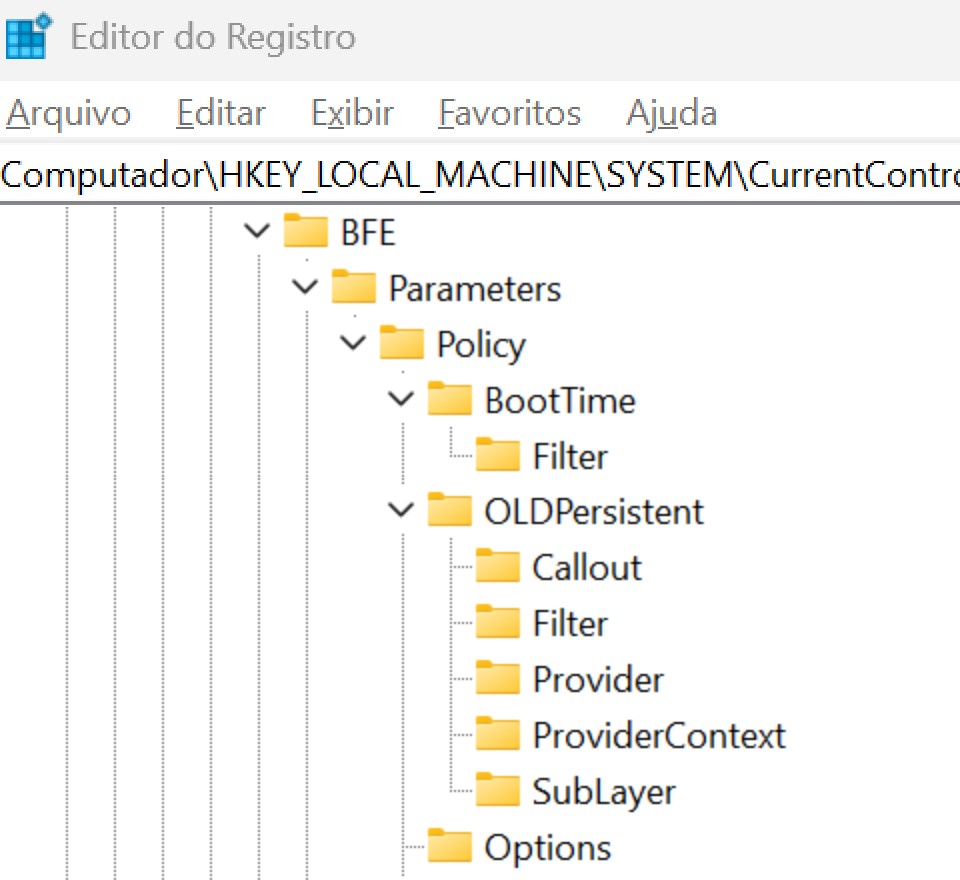
-
The operating system is restarted.
-
Upon startup, BFE does not find the
Persistentkey and recreates it containing only the default objects, without the isolation filters.
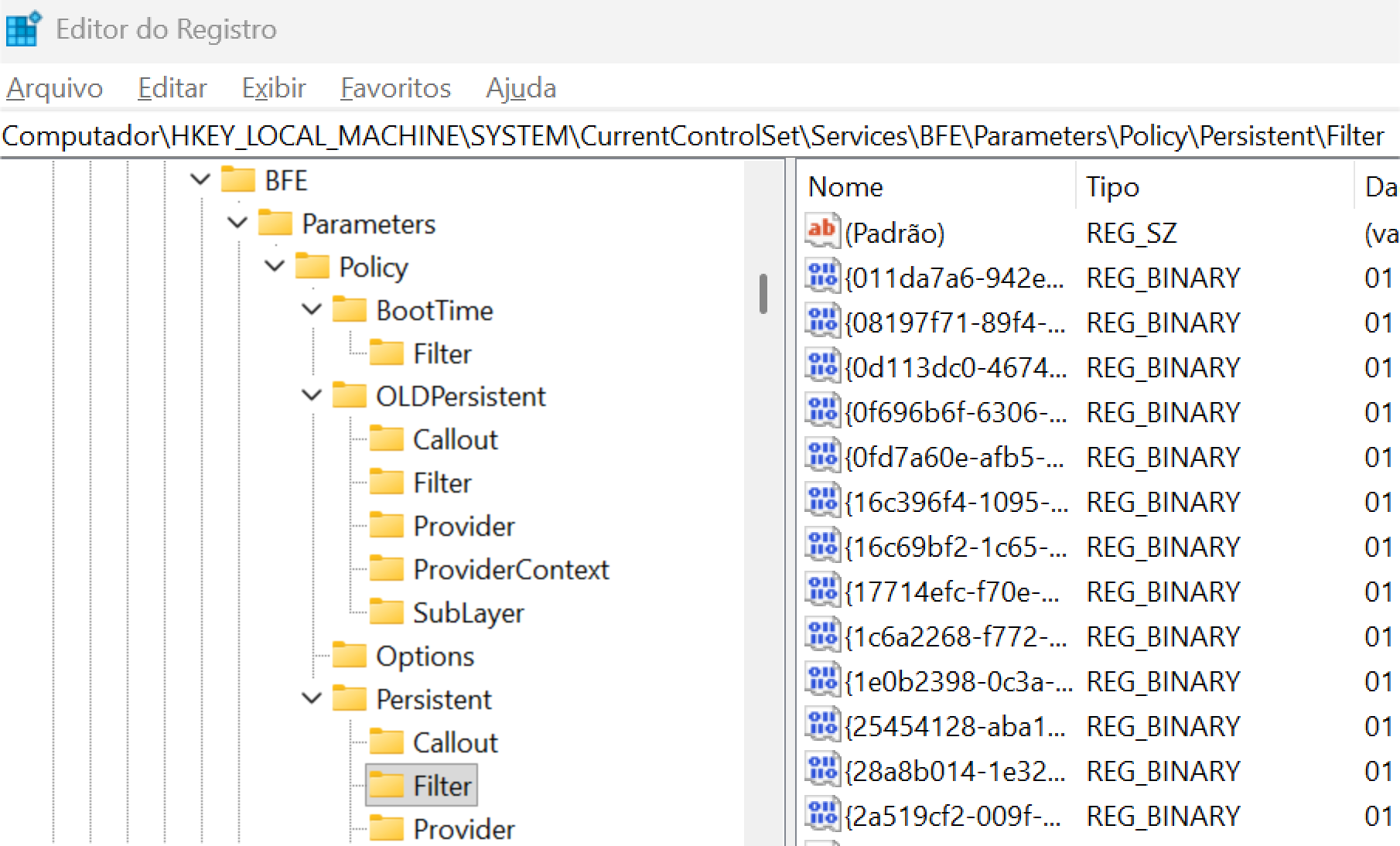
-
PowerShell is used to compare the number of items in the
BFE\Parameters\Policy\Persistent\FilterandBFE\Parameters\Policy\OLDPersistent\Filterkeys.
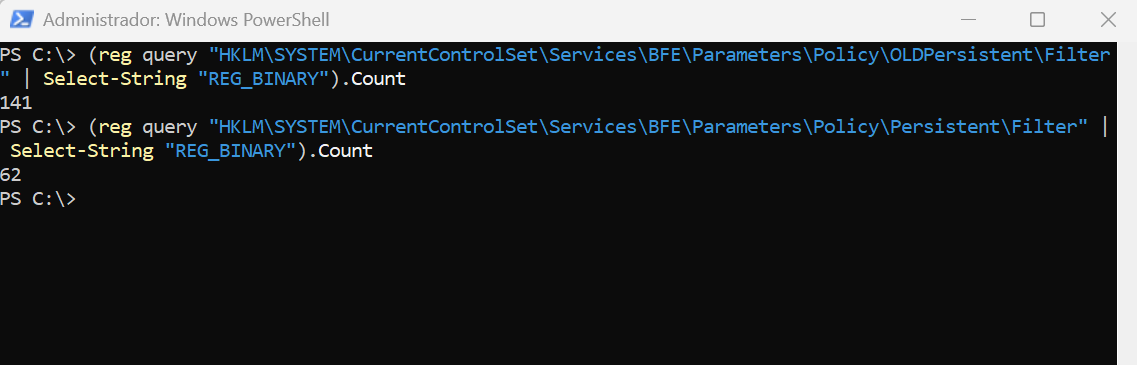
-
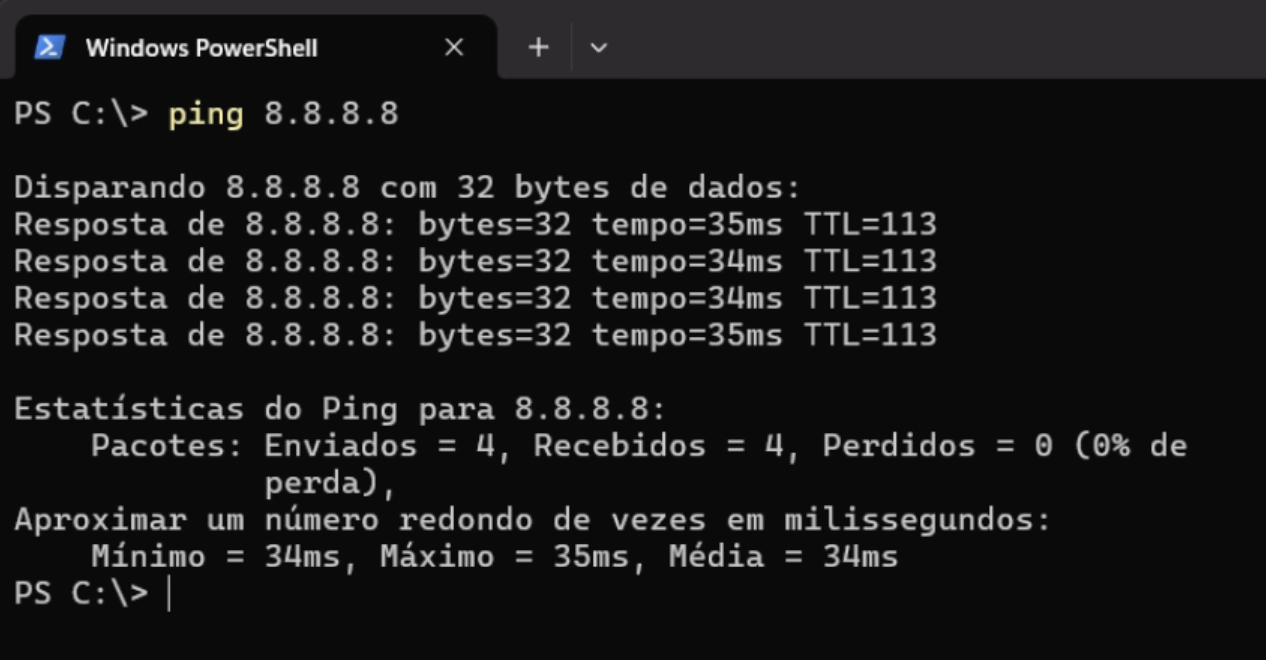
The network stack is initialized without the isolation policy, and the host's connectivity is restored.
-
Microsoft Defender did not reapply the isolation filters, and the host’s connectivity remained functional.
Note: Although this is not the most common scenario in our projects, it is worth highlighting that other security policies or solutions may, as an additional layer of defense, prevent the modification of this registry key. Even in those cases, it is only a matter of time until an attacker with administrative privileges bypasses the protection and achieves the same result. We illustrate the evasion step by step, simulating a malicious employee with access to a physical company device, but the concept applies the same way and can be automated to detect the isolation behavior and apply the evasion from a previously deployed C2, thereby restoring the connection to the server.
Detection
This technique produces artifacts in three domains: registry changes, WFP policy changes, and discrepancies between the reported containment status and the observed network behavior.
1. Modification of BFE Keys
The most direct indicator is the creation, removal, or renaming of keys under Services\BFE\Parameters\Policy.
2. WFP Audit
With the Audit Filtering Platform Policy Change subcategory enabled, Windows logs the following events in the security log:
| Event ID | Description |
|---|---|
| 5446 | WFP callout changed |
| 5447 | WFP filter changed (added, removed, or modified) |
| 5448 | WFP provider changed |
| 5449 | WFP provider context changed |
| 5450 | WFP sublayer changed |
In this technique, the policy change manifests only at boot time, when the BFE reloads the persistent state. The absence, following a reboot, of persistent filters previously associated with the Microsoft Defender provider constitutes an anomaly that should trigger an alert.
3. Behavioral Correlation
The following sequence, observed on the same device, has an extremely low probability of occurring legitimately:
- Application of Isolate device (automatic or manual);
- Change to a service key under
HKLM\SYSTEM\CurrentControlSet\Services\BFE; - System reboot;
- Network traffic to destinations outside the Microsoft Defender service set, while the device is listed as isolated.
Mitigations and Recommendations
- Restrict the local administrator - Apply the principle of least privilege, reduce the number of accounts with local administrative rights, and, when using a privilege management solution, ensure that elevation profiles do not grant unrestricted write access to
HKLM\SYSTEM; - Monitor BFE and isolation profile keys - Implement detection for creation, removal, and renaming in
Services\BFE\Parameters\Policy\PersistentandServices\BFE\Parameters\Policy\BootTime; - Enable WFP auditing - Collect events 5446–5450 in the SIEM, with an alert for bulk removal of filters associated with the security provider.
- Implement behavioral correlation - Isolation → registry change → reboot → traffic resumption;
- Combine Contain device and Isolate device - Since Contain device / Contain IP is applied by other endpoints, it remains effective even after local isolation is removed;
- Restrict registry manipulation tools (
regedit.exe,reg.exe, and PowerShell registry cmdlets) — Do not allow any user in the environment to use these tools; - Treat the reboot of an isolated host as an investigation event rather than operational noise.
References
- Automatic attack disruption in Microsoft Defender — Microsoft Learn
- Take response actions on a device (Isolate / Contain) — Microsoft Learn
- Windows Filtering Platform: Persistent state under the hood — Quarkslab